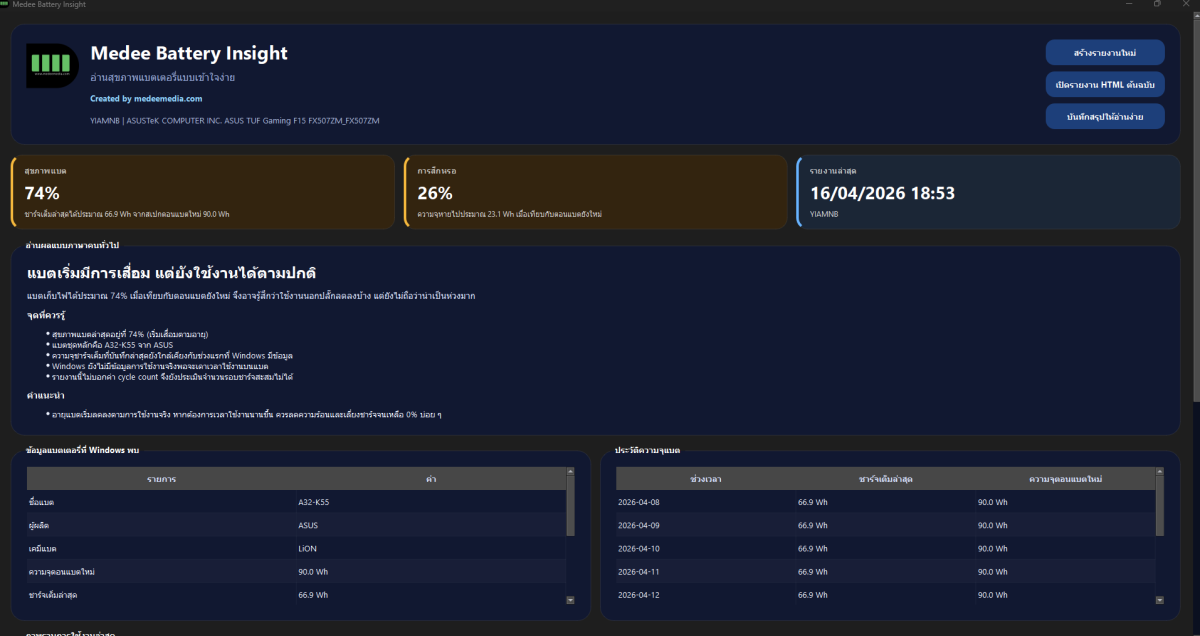
Medee Battery Insight is a free tool for checking notebook battery health in a format that is easier to read than the raw Windows battery report.
- Generates the Windows battery report automatically with
powercfg /batteryreport. - Reads the Windows HTML report and converts it into a clearer summary.
- Summarizes battery health, wear level, and estimated unplugged runtime.
- Explains the result in plain language, such as healthy, starting to wear, or planning for replacement.
- Shows battery details detected by Windows, including battery name, manufacturer, chemistry, design capacity, and latest full charge capacity.
- Shows historical capacity so you can see whether the battery is declining over time.
- Shows the latest usage overview, such as whether the machine is running on battery or plugged in.
- Lets you open the original Windows HTML battery report.
- Saves a simple text summary for later review.
- Can save an activity log for troubleshooting.
How to use it: click the download link below, extract the file, and double-click the program. No complicated setup is needed.